Release notes
This page gathers the application's release notes. You will find the new features, the improvements and the bug fixes shipped in the application.
September 2026 release
User fields can now carry a semantic identity type (email address, phone number, location, and so on). The type is suggested automatically from the field's type or label, and a field that duplicates an existing semantic type is flagged. The user data form has moved into a modal with a reworked layout.
The interaction search and insights endpoints now let you choose which population to query, across three independent states: regular traffic, the traffic your filters exclude, and bot traffic.
Inviting several people at once now reports what happened to each address, instead of a single verdict for the whole batch, and shows the reason when an address is refused. Pending invitations expire after thirty days.
When a change of access fails, the reason is now shown instead of a silent failure. A project whose setup is taking longer than expected is flagged in the interface, and the technical team is notified when a setup fails. The billing entry is hidden from the agents who do not have access to it, rather than leading them to a refusal.
In the campaign explorer, a column whose metric identifier collided with an event type reference could not be selected any more. Column identifiers are now namespaced, which ends the collision.
Offline interactions are counted again in interaction insights and when the index is rebuilt. Fixed a TikTok pagination that could loop indefinitely, and added support for TikTok smart ads in the landing URL checks.
August 2026 release
The performance import chart of an integration now shows the periods where imports are frozen, and sorts failures by category with the message returned by the advertising platform. An integration frozen on its own is distinguished from an outage affecting the whole advertiser account.
The evolution chart of a traffic source node now offers the click-through rate, the cost per click and the cost per thousand impressions, alongside the existing metrics.
The assistant's detailed reasoning is now rendered live while it works, formatted as it arrives rather than appearing at the end in one block.
This feature requires joining the Webmarketer Next program.
The public documentation is now published in English, which becomes its default language.
The French version remains available under the /fr prefix, and a language selector lets
you switch at any time.
The billing information form could not be submitted any more, and the postal code was not passed on when updating a payment customer. The navigation menu disappeared after a re-authentication. A SQL audience preview returned no users when the identifier column was aliased, and could raise a warning that did not apply.
July 2026 release
A user's customer journey has been reworked from end to end. It now loads progressively over a two year window, with an explicit control to load further back, and an entity selector to show everything, only events, or only interactions.
A display settings modal lets you adapt the timeline to your reading: density, placement of event statuses and statistics, grouping distance, time format, and whether sessions are expanded by default. A flat display shows page views inline with the time spent on each of them, and each event opens into an expandable detail area.
A session's page views are now shown as a dense mini timeline, with the referrer under the entry page, compact browser, operating system and location cards, and an explicit empty state when a session has no page view.
The child nodes of a traffic source can now be searched and paginated, with their true count, and sorted by name in either direction, a preference that is remembered. The page also shows the distribution of a node's interactions by their position in the user's lifetime.
A conversion export pipeline towards Google Ads is now available over the API. It creates the conversion actions, pins their click-through lookback window, and enriches the exported conversions with hashed user identities for enhanced conversions. A dedicated attestation endpoint records the consent required to export them.
This first phase is exposed over the API only. A user interface will follow.
Event type fields can carry a semantic identity type, describing what a field holds rather than only how it is typed. Existing fields are backfilled automatically.
A render loop was pinning the CPU on the interaction explorer, which made the page slow and the browser hot. It has been fixed.
Datetime axis labels are now localized in every chart. The navigation menu is reachable again on mobile. Interactions are no longer duplicated across the customer journey's paginated pages. The analyst role can now open an event's debug page.
June 2026 release
A new detail page is available for every node of your traffic sources, whether it is an advertising account, a campaign, an ad group or an ad. It brings together the node's key metrics, interactive breakdown charts, a comparison between two date ranges, a breakdown by hour of the day, and the list of users attributed to that node.
The navigation has been reorganized into collapsible folders, and the configuration screens have moved out of the gear menu into the sidebar. The sidebar can be collapsed into a rail, where each folder opens as a flyout.
You can now define rules that attach interactions to a custom traffic source campaign, based on criteria on the landing URL or the referrer. This is how you attach traffic that carries no tracking parameter, such as a newsletter, an SMS campaign or a partner link, to the right campaign.
A rule can be simulated before it is saved, future interactions are taken into account immediately, and past interactions are recomputed, either on demand or by the nightly retroactive recompute.
This feature requires joining the Webmarketer Next program.
A new generation of dashboards comes with a reworked widget editor, built around an explicit choice of data source and visualization. Widgets accept a description, export their data to CSV from an always available menu, offer multi dimension attributed insights, and expose your computed columns as metric chips in a palette grouped by category.
This feature requires joining the Webmarketer Next program.
The SQL engine now supports more constructs, for richer analyses: type conversions
(CAST and SAFE_CAST), date part extraction (EXTRACT),
structures (STRUCT), array expansion (UNNEST) as an operand,
recursive queries (WITH RECURSIVE), explicit null ordering
(NULLS FIRST and NULLS LAST), interval operands, the modulo
operator and ANY_VALUE.
This feature requires joining the Webmarketer Next program.
Attributions now carry markers describing the distance between an interaction and the conversion it contributed to, which opens the way to analysing how long your conversion paths really are.
May 2026 release
The assistant can now build an audience with you, in conversation. You describe what you are looking for, it proposes a query, and each proposal is shown as a card in the conversation with a live preview of the matching users. The assistant is available both when creating and when editing an audience.
This feature requires joining the Webmarketer Next program.
The assistant's detailed reasoning can now be streamed while it works. Under the hood, it carries a domain glossary, detects the loops it used to get stuck in, runs a turn's tools in parallel, and is held to stricter rules against unverified causal speculation.
This feature requires joining the Webmarketer Next program.
Raw event processing now tolerates outages lasting several hours: failed work is retried with an increasing delay instead of being dropped, and can be replayed manually. Events still waiting for their visitor to be resolved are ingested once that resolution times out, rather than being lost. Failed attribution jobs are replayed as well.
The consent screen was shown on every login for the Connect and Zapier integrations. The notification menu could render empty, and several alert links pointed to the wrong page.
The performance explorer's table header now stays visible while scrolling. The custom campaign list resets its pagination when the search changes. The interaction explorer's filter menu no longer comes up empty. The current workspace is always shown first in the workspace selector.
April 2026 release
The whole Webmarketer interface is now available in English in addition to French. A language selector lets you switch at any time.
A new generation of the audience engine is here, with a dedicated query language that is more expressive and more performant. New pages and a new editor are available, with a clearer distinction between empty audiences and audiences still being computed.
Existing audiences are migrated automatically.
This feature requires joining the Webmarketer Next program.
A new SQL editor is available to query your data directly. It offers syntax highlighting, schema-aware autocompletion, accepting suggestions with the Tab key and a "Prettify" button to format the query automatically.
This feature requires joining the Webmarketer Next program.
The campaigns of custom traffic sources (Custom Ads) are now created automatically as soon as a visit using the campaign is detected. The default name reuses the campaign identifier.
The "active/inactive" notion and the "unassigned" tab have been removed: every campaign is now shown in a single view.
Integration cards now show a warning when a token is about to expire. LinkedIn credentials are automatically flagged as invalid on token expiry or authentication error. The credential status on an integration's detail page has been fixed as well.
A new event search endpoint is exposed, letting you filter and paginate events by date range, user, event type and field predicates.
Fixed an off-by-one-day shift in the performance explorer's date picker. Fixed UTC handling in the dashboard, the interaction explorer and the campaign explorer. The project timezone is now correctly passed to the date input component and to date range queries.
The workspace and project pickers (home screen and in-app navigation) now support keyboard navigation.
The interaction explorer and the event type form have been optimized (memoization, stabilized callbacks, longer debounce, hooks extraction).
March 2026 release
Numeric fields now accept numbers sent as strings, and vice versa for string fields. State fields accept booleans. A race condition on nonce deduplication has been fixed with a Redis mutex. Empty email fields no longer cause an error during matching.
Event fields are now all optional, and the errors caused by missing or invalid fields are shown in a dedicated section of the user interface.
Two new external notifications are sent when a workspace exceeds, or approaches, its usage limit.
Event types get a schema redesign (table layout, inline editing, JSON panel always visible with copy). Invalid or missing fields are now shown in a collapsible section with tooltips. The JSON preview shows realistic sample values. The mobile experience has been greatly improved.
Fixed scrolling in the workspace menu. Fixed the display of agent emails in member chips. Fixed the filtering of empty location fields. Fixed fuzzy search below the character threshold.
February 2026 release
You can now export the data of the campaign explorer. This feature lets you retrieve your campaign performance in a format usable outside of Webmarketer.
Webmarketer can now configure your Google Ads accounts automatically when connecting. This feature simplifies the initial setup of your Google advertising integrations.
Bing Ads (Microsoft Advertising) asset groups are now supported in the tree of your traffic sources. You can therefore review the performance of your Performance Max campaigns at a finer level of detail.
The email addresses sent within events are now normalized automatically. This improves user reconciliation by avoiding duplicates caused by differences in case or whitespace in email addresses.
A search bar is now available on the home screen to quickly find your projects and workspaces.
The Twitter traffic source has been renamed to X throughout the interface, to reflect the platform's rebranding.
Fixed how dates are displayed in the campaign explorer (timezones). Fixed the date picker (the upper bound used the start date instead of the end date). Fixed the audience size history. Fixed the invitation loop on workspaces. Improved the reliability of event processing.
October 2025 release
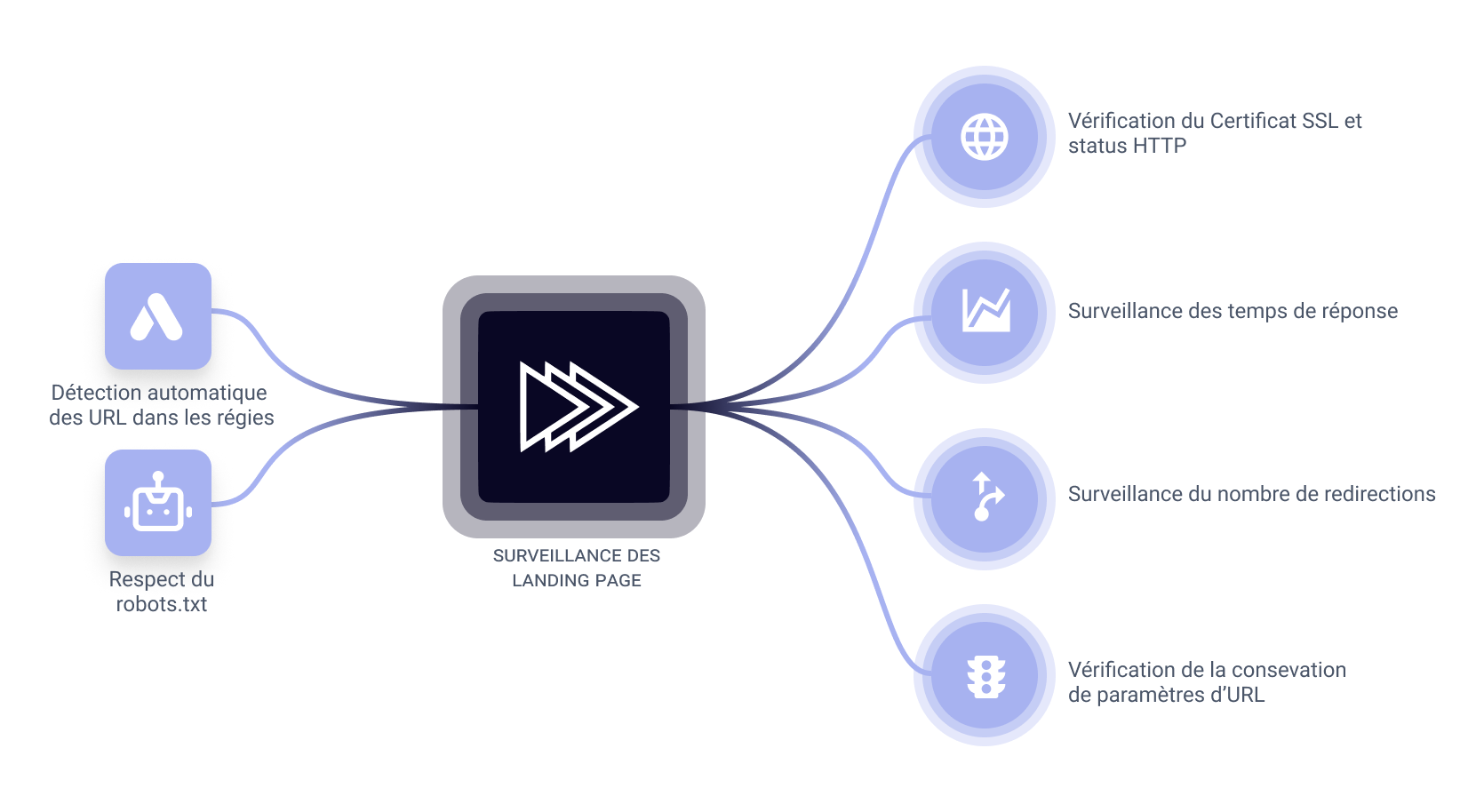
This new version introduces the monitoring of your landing pages. This feature checks that the landing URLs of your marketing campaigns are reachable within a reasonable time, and that your server configuration properly preserves URL parameters across redirects.
The first phase of this feature is data collection. In the near future, a monitoring report will be available in the user interface to alert you whenever there is a problem.
Learn more about landing page monitoring
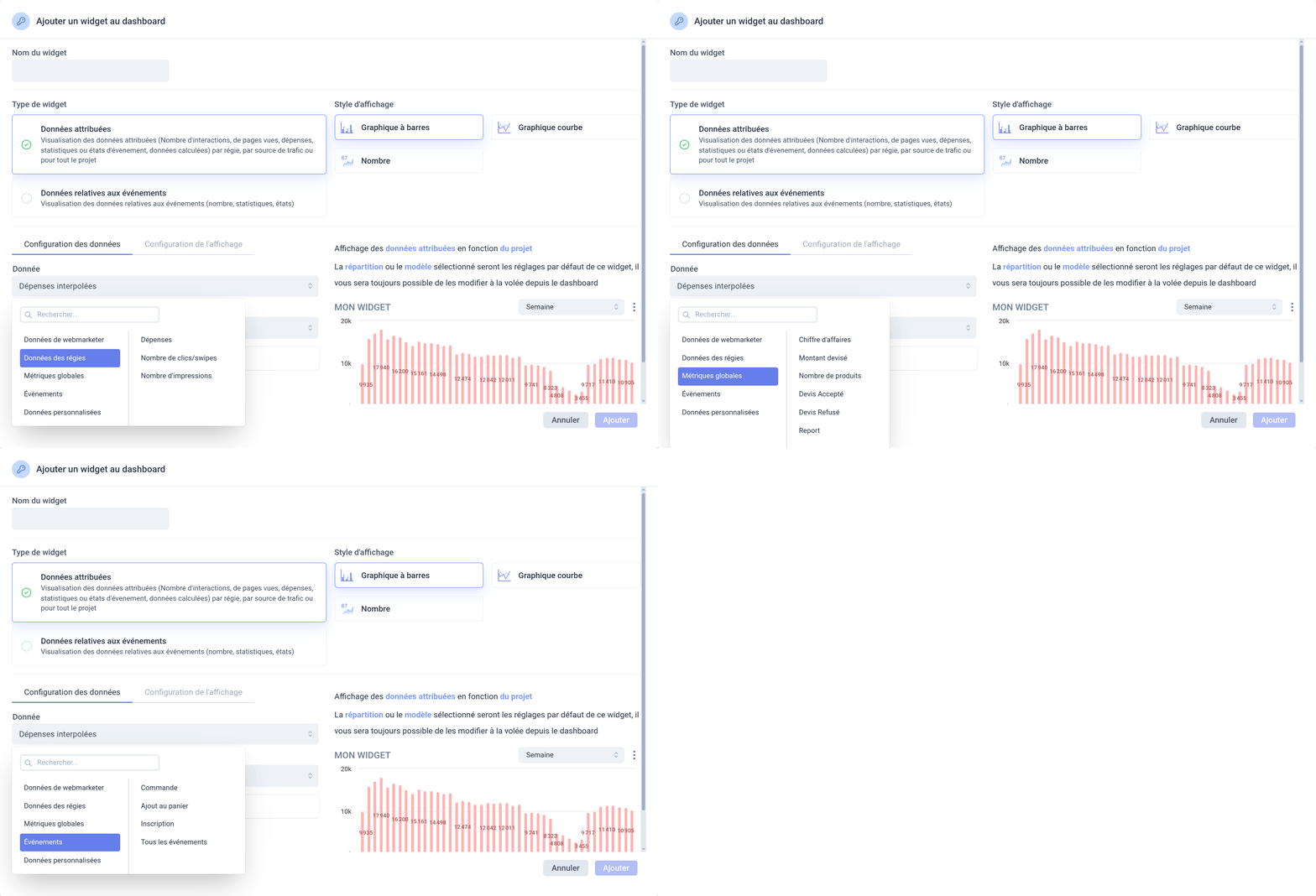
You can now select the same metrics as the ones available in the performance explorer. That way you can display the number of events of a given type (purchases, sign-ups, and so on) in your dashboards without having to create a custom metric.
Email notifications now follow a more sensible sending schedule. They are now sent during daytime slots for the automated processing that runs overnight, and sent immediately for actions performed by users in the interface.
To keep attribution from being spread too thin, events, states and statistics are attributable to at most 500 interactions. If more than 500 interactions are eligible for attribution, the most recent ones are kept (except for First interaction attribution models). This new rule significantly reduces computation time when your reconciliation data is misconfigured.
Fixed the display of variations (division by zero). Fixed the encoding of values when copying the URL. Translated missing strings in the user interface. Fixed the audience list. The active tab is now persisted in the interface.
September 2025 release
The user agent and the referrer are now collected and stored for every event sent to Webmarketer. That data is intended to make it possible to filter out the events coming from bots and automations.
This version brings improvements to attribution processing. Those optimizations significantly reduce the time spent computing attributions and indexes, especially for projects with a large volume of data.
August 2025 release
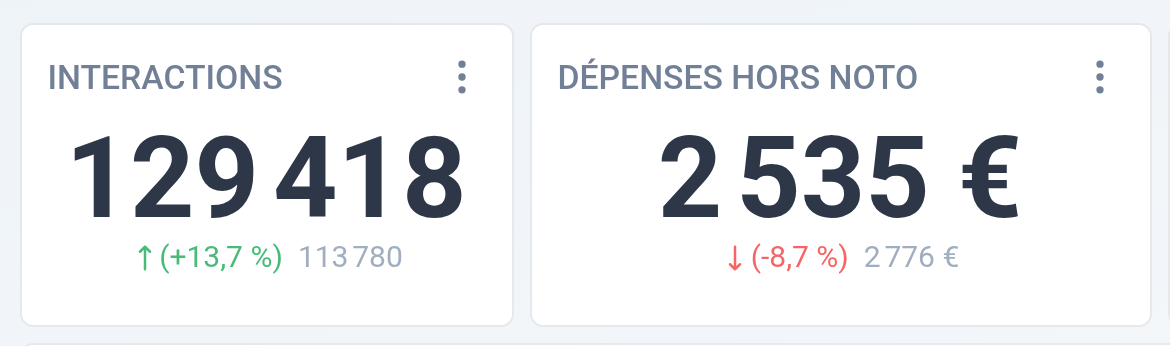
This version introduces the ability to compare two date ranges in dashboards. This first iteration lets you display variations on "Number" widgets. Bringing comparison to the other widgets is planned for upcoming versions.
You can now declare some URL parameters of your project as protected. Those protected parameters are then automatically replaced with "***" whenever Webmarketer spots them in URLs.
This removes any sensitive data travelling in URLs, such as session identifiers, authentication tokens or personal information.
This update changes how events are attributed when every interaction is filtered out by a traffic exclusion rule.
Instead of showing up as non-attributed, the event is now excluded from attribution reports. This makes it possible, for instance, to exclude every event coming from Google's bots when you set up Webmarketer through Google Tag Manager.
You now have the same predicates in the attribution engine as in the other attributed reports. For example, you can now increase the weight of an interaction based on a campaign's type.
You can now delete your projects from the user interface without contacting support. You get a 30-day grace period to cancel the deletion.
Before this update, Webmarketer issued invoices even for your free workspaces. Now, only invoices above €0 are issued.
Translated missing strings in the user interface. Sorted dropdown lists. Added links to tabs in menus. Added payment method expiry alerts. Fixed the tracking URLs on the traffic sources page.
Deduplication and aggregated statistics
This new version introduces an attribution deduplication mechanism to avoid double counting interactions. When a visitor makes several visits to your website from the same marketing lever, only the first interaction is taken into account when computing attribution.
This option is available on the edit page of your attribution models and lets you define a deduplication window in seconds. Note that existing attribution models are not affected by this change, and that enabling this feature is a manual step.
This version adds the ability to display, filter and sort by the aggregated data of statistics and states on users. In the user explorer, you can now add aggregated columns (sum, min, max, average, count) for each user statistic and state.
This feature makes it easier to find the users, for example:
- who made several purchases
- whose average cart value is above €100
- who have more than 3 products per order on average
Added an API endpoint for synchronous event ingestion. That endpoint is especially useful to implement custom CRM connectors that need to send events and attach statistics and states to them right away.
Minor bug fixes and improvements:
- Added URL parameters on dashboards (allowing sharing and page refresh).
- Fixed the formatting and copying of URLs on traffic sources.
- UX overhaul of the custom campaign management pages.
- Added detailed date formats on hover in the interface.