Attribution models
Introduction
Attribution models are tools that determine how much each marketing channel contributes to a customer's journey. They are essential to understand how a customer's various interactions with your brand influence their buying decision.
In a world where customers interact with your brand through many touchpoints (online ads, emails, social networks, and so on), it is crucial to work out the impact each channel has on conversions. Attribution models make it possible to measure the return on investment (ROI) of each channel (campaign, ad group or ad) by assigning a value to each interaction.
An attribution example
Consider the following buying journey:
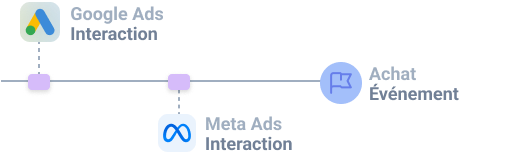
- A user lands on your website through a Google Ads ad, then browses it without buying anything.
- A few days later that same user comes back to your website through a Meta Ads ad, browses it again and makes a purchase.
How do you determine which ad(s) (Google Ads or Meta Ads) contributed to the purchase?
In our example above, the contribution of each ad is computed differently depending on the attribution model.
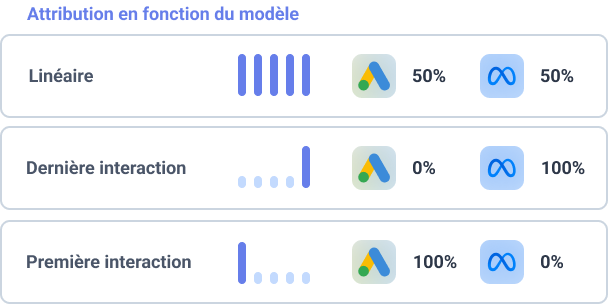
Using the First interaction attribution model attributes 100% of the conversion to Google Ads, implying Meta is 0% responsible for that sale. Yet Meta Ads likely played a part in the buying process.
Using the Last interaction attribution model attributes 100% of the conversion to Meta Ads, implying Google Ads is 0% responsible for that sale. Yet Google Ads likely played a part in the buying process.
The Linear attribution model attributes 50% of the conversion to Google Ads and 50% to Meta Ads, implying both ads contributed equally to the sale.
These days, people interact with brands through many channels and devices. This is why multi-touch attribution models are increasingly used to get a more complete view of the customer journey.
We therefore recommend:
- favoring multi-touch attribution models for a more complete view of the customer journey
- not restricting yourself to a single attribution model
Attribution model
Webmarketer lets you use and compare up to 5 different attribution models (depending on the plan you chose), so you can explore and determine which model best fits your marketing strategy and your customers' behavior.
Attribution models are not set in stone and can be adjusted over time. On each change to a model, Webmarketer then recomputes all of the ingested data with the new model, retroactively.
The different attribution models
Webmarketer offers the following attribution models:
show more
This model splits the credit of the event, state or statistic equally across all the interactions that led to that event.
show more
This model attributes X% of the credit to the user's first interaction and X% to their last interaction, then splits the remaining X% across the interactions in between.

show more
This model gives more credit to the interactions that are chronologically closest to the event. Credit is spread according to a half-life of X days. In other words, an interaction made X+1 days before an event receives half as much credit as an interaction made one day before the event.

show more
This model gives all the credit for the event to the user's first interaction.
A custom rule can be added to refine what counts as the first interaction.
show more
This model gives all the credit for the event to the user's last interaction.
This model lets you define the logic used to determine the last interaction, so you can build a "last non-direct interaction" model, for instance:
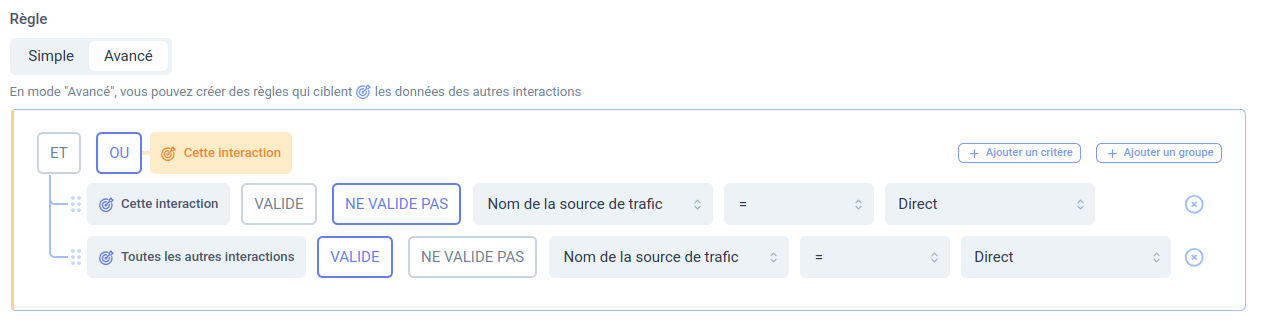
The rule above is evaluated on each interaction, starting from the last one, until an interaction satisfying the rule's conditions is found.
Here:
- If the interaction is not direct, it is used for attribution
- If the interaction is direct and every other interaction is direct too, attribution then goes to direct
- Otherwise, move on to the previous interaction
Attribution window
The attribution window is the period during which an interaction is taken into account when attributing an event, a statistic or a state. For example, with a 30-day attribution window, any interaction that happened more than 30 days ago cannot be designated as attributed.
In other words, the attribution window determines after how long you consider that an interaction no longer had any impact on a conversion.
Choosing that window matters, as it drives how events, states and statistics are attributed to the various traffic sources.
The maximum attribution window depends on the plan you selected: it can range from 1 to 90 days on the Free plan, and go up to 3 years on custom plans. See Webmarketer's pricing page for more information.
Interaction deduplication
This option lets you define a deduplication window for interactions.
Within that time window, if a visitor starts several interactions from the same source (search engine, campaign, ad group), only the first interaction is used for attribution.
This mechanism keeps you from counting the same lever several times when a user starts several new sessions within a short span of time.
Default value: 10 minutes (600 seconds)
This feature went live on March 17, 2025. So as not to change your data retroactively and to preserve your analysis reports, this option was not enabled automatically on the models you created before that date.
You can enable this option manually on your attribution models.
Custom attribution rules
Webmarketer lets you configure custom rules to adjust how events, states and statistics are attributed to each marketing channel. Those rules offer greater flexibility to tailor attribution to your specific needs.
In multi-touch models, those rules let you apply a coefficient to the credit attributed based on several criteria: the ads themselves (name, ID, ad platform type, and so on).
In single-touch models, those rules let you set conditions to determine which interaction to attribute to.