Configuring Bing Ads URL parameters
To work at its full potential, Webmarketer needs to identify which ad platform, campaign or ad group your visitors come from.
To make that possible, you have to tag the landing page URLs of your campaigns with parameters that identify the ad nodes the session originated from.
In Bing Ads, the URLs redirecting to your website can be configured at every node level (account, campaign or ad group). That kind of configuration is not recommended though, since it remains possible to miss some campaigns, which then prevents Webmarketer from matching your Bing Ads sessions with the corresponding ad spend.
So that the URL parameters apply to all of your ads, current and future ones alike, we recommend configuring this at the account settings level.
Expected parameters
wmktid: tells Webmarketer which integration the session originated fromagid: tells Webmarketer which ad group the session originated from
The placeholders provided by Bing, such as {AdGroupId}, let you configure all of your ads generically in a single operation.
Account-level tracking configuration
The URL parameters must be configured through the Final URL suffix option (Campaigns menu > Settings > Account level options).
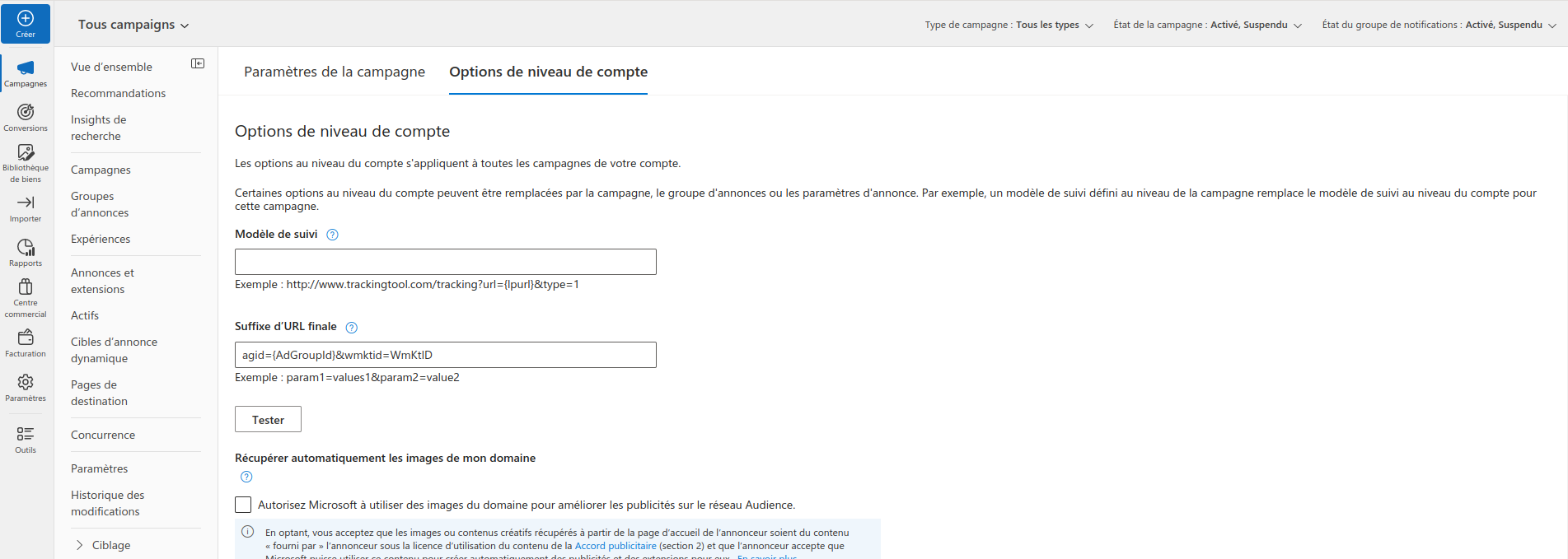
Bing also lets you configure a tracking template for the account. We nevertheless recommend adding the URL parameters as a Final URL suffix to make sure Bing always forwards the parameters to the landing page.