Configuring TikTok Ads URL parameters
To work at its full potential, Webmarketer needs to identify which ad platform, campaign, ad group or ad your visitors come from.
To make that possible, you have to tag the landing page URLs of your campaigns with parameters that identify the ad nodes the session originated from.
In TikTok Ads, the URLs redirecting to your website can be configured at the campaign, ad group or ad level. That approach is not recommended though, as it is easy to miss some items, which prevents Webmarketer from correctly matching your TikTok Ads sessions with their ad spend.
So that the URL parameters apply to all of your ads, current and future ones alike, we recommend configuring this at the account level whenever possible.
Expected parameters
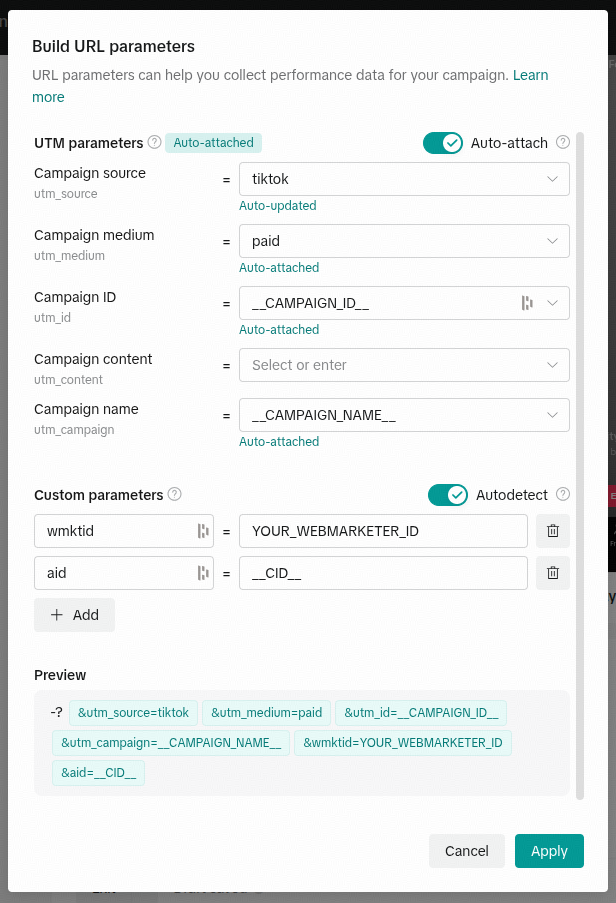
wmktid: tells Webmarketer which integration the session originated fromaid: tells Webmarketer which ad the session originated from
TikTok provides the __CID__ placeholder, which dynamically resolves to the ad ID.
Tracking configuration
The URL parameters must be added to the URL parameters field available in the tracking settings at the account level (or, if unavailable, at the ad group level).
Example of a suffix or tracking URL to add: